1. Friction for 3D Generation Tools
A pattern that often occurs across 3D workflows: a team tries a generative AI tool, gets some interesting outputs, and then hits a wall when they try to efficiently use those outputs in production. The results don't match their style, the control mechanisms are lacking, and the tool lives outside the environment where all their other work happens. The generative model was impressive. The integration wasn't there. This problem shows up in 3D modeling, concept art, industrial design, mechanical engineering, game development, VFX, virtual production, synthetic data generation, digital twins, ... anywhere teams work with complex assets and established pipelines.
The same friction shows up in a different form for robotics teams building perception models or manipulation policies. A robotics team needs thousands of realistic, annotated 3D scenes to train and evaluate navigation and grasping policies. A computer vision team needs diverse variations of a warehouse layout to train an object detector. They could model each scene by hand, which doesn't scale. An alternative is unconstrained generation, which produces broad data that looks plausible but goes too far and overcomplicates the learning problem. The control problem is fundamentally the same: you need generation that respects the structure you already know to be correct.

Ideally, generation would live inside your existing tools, respect the geometry you've already committed to, and even pull from your asset library to stay grounded in your style and design language. This post walks through one concrete example showing an integrated workflow: a custom Blender add-on for constrained 3D generation and editing.
The Control Problem in 3D Ideation
Early-stage ideation in 3D is time-intensive by nature. Sketching an idea in 2D is fast; translating that into actual 3D geometry is not. Generative AI changes this equation: it can produce 3D assets in a fraction of the time, making it genuinely useful for rapid prototyping and exploring design variations early in the process.
The catch is control. Most 3D generation models give you limited ways to communicate your intent. You get an output, it fills in the blanks in ways you may not want, and iterating is tedious. On top of that, 3D modeling is easiest in tools you already know inside-out, there's no reason to reinvent that. The goal is to bring generation into that existing environment, not replace it.
2. API-Based 3D Generation in Blender
The example showcases a Blender add-on that integrates constrained 3D generation directly into the modeling environment. The starting point is an existing model in the scene, not a blank canvas. The user defines where generation should happen and where it shouldn't using geometry defined in Blender, sends that to our server, and gets back a set of variations to evaluate.
Connected through an API
The generation runs through an API call on our Datameister GPU platform using an adapted version of Trellis, which means we handle latency, queue management, and can adapt the model to a client's specific data and style. Queue status and active users are surfaced directly in the UI; mesh normalization and other pre/post-processing steps are handled automatically.
Blender is the environment we used here, but the same approach applies to any software that supports plugins: CAD tools, simulation environments, game engines, or pipelines like ComfyUI workflows. The integration layer is what matters for end users. This also means we're independent of any specific model and can choose whichever works best for a given use case.

Steering with Go-Zones and No-Go Zones
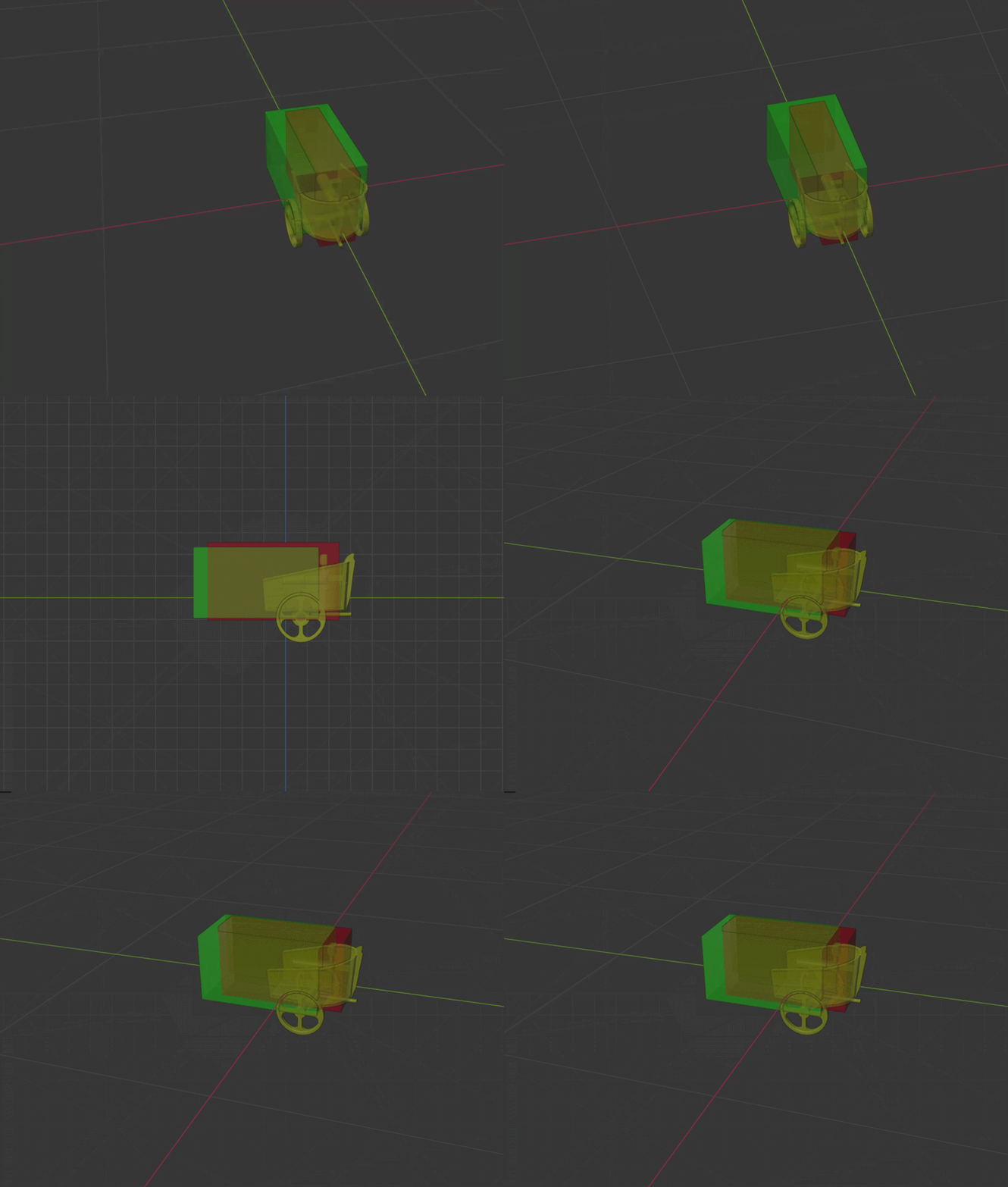
The constraint system is a custom-built algorithm and the piece that makes this practical for real production work. The add-on lets users define go-zones, bounded volumes where the model is free to generate, and no-go zones, regions that must not be touched. These are set directly in the Blender viewport and passed to the model at inference time.
Instead of generating into a vacuum and manually cleaning up afterward, the creator is steering from the start. Take an existing asset, mark the part you want to explore variations on, lock the rest, and get back options that respect the structure you've already committed to. That's a different experience from prompt-and-hope. You can read more about the approach in our post on constraint-aware 3D generative design.
For synthetic data, this constraint system maps directly to domain randomization with guardrails. You have a validated base scene: a robot workcell, a warehouse aisle, a surgical tray, and you want to generate diverse variations for training and evaluation while keeping the structural layout physically plausible. Go-zones let you define where variation should happen while no-go zones lock what must remain fixed.
3. Staying Close to Your Tools and Your Assets
When AI lives inside your modeling tool, it can see your scene, query your asset library, and match your established style and design language. Say you have a catalog of 500 parts or environment props built over several years of production, the add-on can search that library, surface the closest matches to what you're generating, and use them as style and geometric references. 3D generation stays grounded in what you've already approved rather than producing something generically plausible that needs reworking. The same applies to synthetic data: a robotics team doesn't want hallucinated objects, they want controlled variation on validated CAD models from their own part catalog. This is an underrated aspect of well-integrated tooling.
This also opens up a different way to build full scenes: combine existing assets for the parts that are already right, and use generation selectively for the gaps: a unique prop, a surface variation, a structural element you don't have yet. Generation where it matters, reuse everywhere else.
Staying close to familiar tools accelerates adoption. No new platform, no file format changes, no disruption to review. This applies whether you're a 3D studio, a game developer, an engineering firm, a manufacturer, or any team with an established 3D pipeline. Integration that respects existing conventions is what makes the difference between something teams try once and something that sticks.
4. Where This Is Going: Blender MCP & friends
Blender MCP is another example of AI integration, albeit more open-ended. We also have our own version of it at Datameister, called DD3M. It operates with fewer constraints and allows chatbots to execute virtually any action in the scene, which produces results that range from genuinely impressive to frustrating, sometimes within the same session.
Ask it to build a beach scene from a reference image and it'll pull HDRIs, place assets, and set up lighting in minutes. Ask it to position an object at precise coordinates and it may place it incorrectly three times in a row. The capability is clearly there; the reliability isn't.
What bridges that gap is guardrailing and purpose-built tooling. Rather than exposing the full action space to a language model and hoping for the best, the more productive path is defining a set of fixed operations the model can invoke with confidence and letting the model choose between the operations and the free-form code generation. This separates what the model decides from what the model executes. Two concrete directions stand out:
- Automating repetitive work. Scene cleanup, naming conventions, LOD generation, UV unwrapping, file format conversions, ... tasks that are well-defined but tedious are a natural fit. A language model doesn't need creative latitude here; it needs reliable tools to call. For synthetic data pipelines, this extends naturally to automating scene randomization: camera placement sweeps, lighting rig variations, material permutations, physics-based object drops.
- Accelerating asset reuse. Most studios are sitting on years of approved assets. With the right tooling, a model can search that library semantically, surface relevant matches, and drop them into the scene.
5. Conclusion: the Advantage of Independent Development
We're not a foundation model lab. We take the best available (also legally-available) models, open-source, fine-tuned, or third-party, and build the layer that makes them usable in production: deployment infrastructure, custom tooling, fine-tuning on client data, and in some cases algorithms built from scratch. The go-zone/no-go zone system for 3D generation is an example of the latter, not something you get by calling an off-the-shelf API. The same depth applies across domains: strong generalist models exist for 3D, vision, and language, but making them work well for a specific team in a specific context is a different problem entirely.
The thread running through this post is that well-integrated controlled generation is a shared primitive. The same mechanisms that let a designer explore variations on a product housing while locking the mounting points also let a robotics team generate thousands of training scenes while keeping the physical layout plausible. The integration work is there to reduce the friction, facilitate creative flow or automate synthetic data pipelines.
If your team is working with 3D assets and wondering how generative AI could fit into your existing pipeline without disrupting it, we'd love to talk. Whether you're exploring early-stage ideation tools, looking to make better use of an existing asset library, or want to automate the tedious parts of your workflow, we can help figure out where AI adds real value and build the integration to facilitate fast adoption. Reach out to start the conversation.